自本年 3 月离职以来,中间休息了半个月、准备了半个月面试,到 4 月中旬上岸。因为本身还是想找一个偏渲染 + Agent 开发的工作,所以开发了这款集跨端 + 渲染 + Agent的作品用于面试(面试多靠它)。经过陆陆续续的打磨,功能已完善。目前支持:
- Electron 高效渲染;
- 富文本、特效、转场、动画;
- OpenGL 跨端支持:mac、Web、Linux、Win(未测试);
- Agent 对话式驱动 SDK + UI;
- 对话式资源设计;
- 持久化、自动上下文压缩。
效果预览 + 性能指标
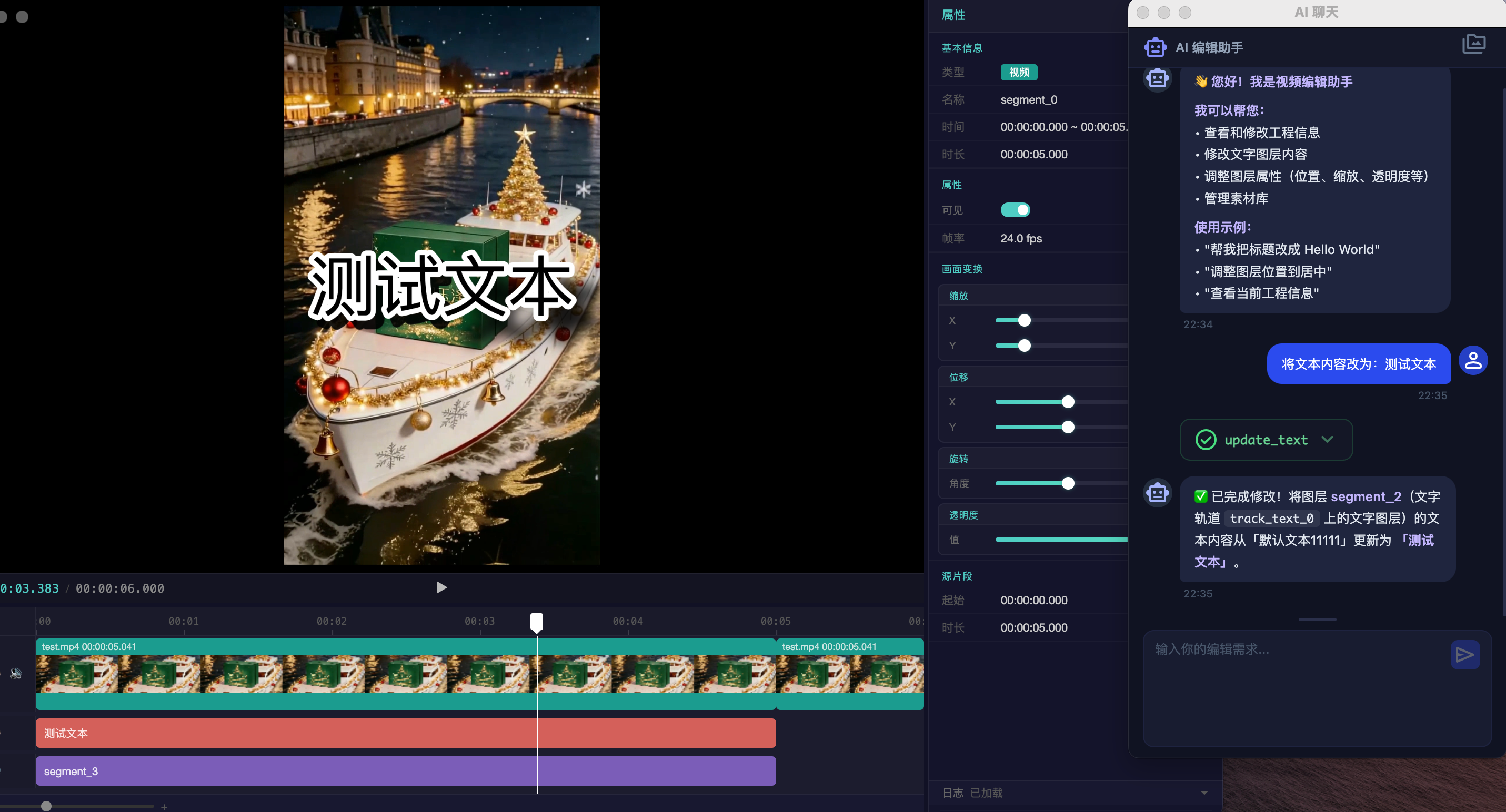
画面:
Agent 驱动的 NLE 编辑器
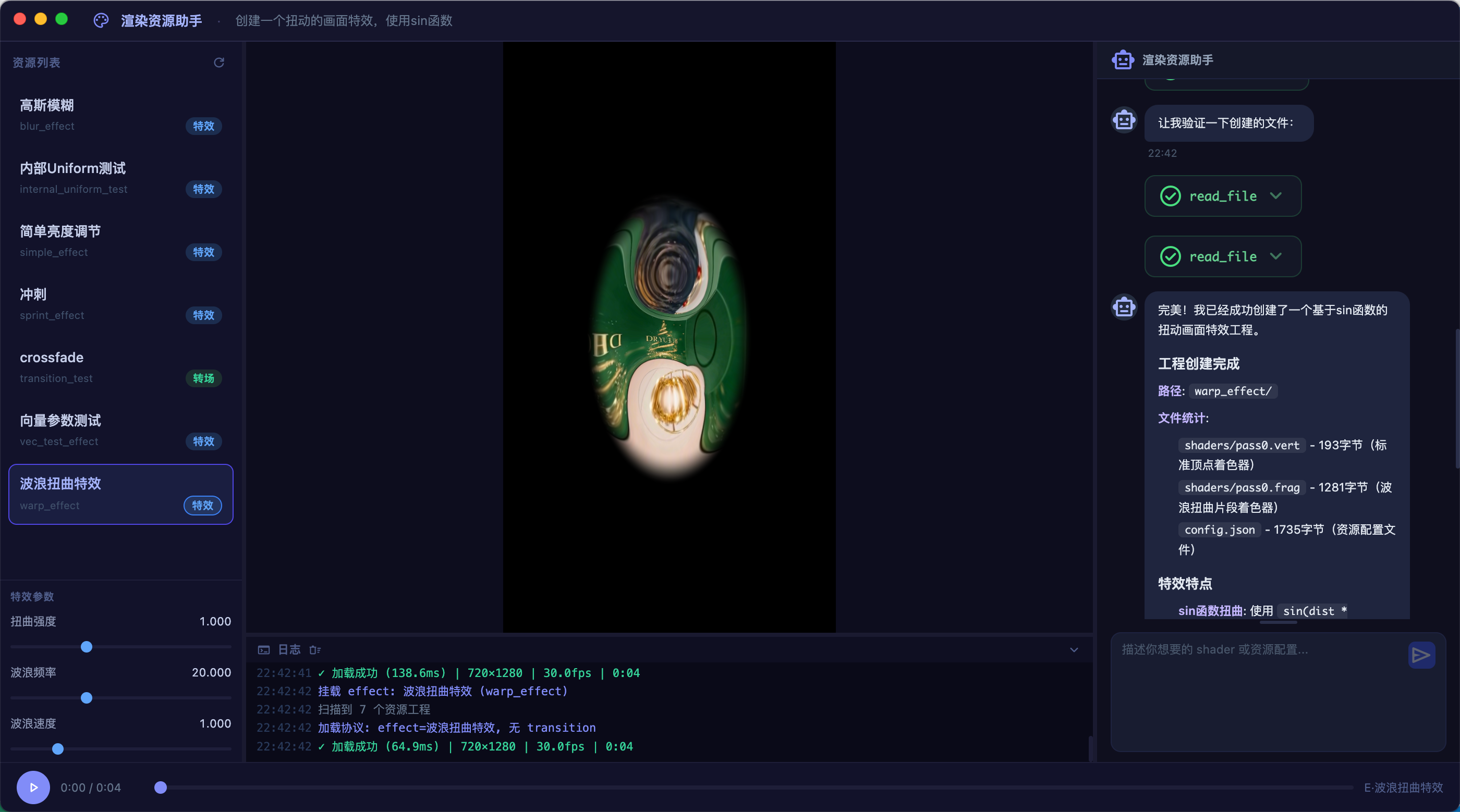
Agent 驱动的资源设计
性能指标数据(毫秒级展示):
[22:47:31] 初始化...
[22:47:32] GPU: Google Inc. (Apple) - ANGLE (Apple, ANGLE Metal Renderer: Apple M1, Version 26.1 (Build 25B78))
[22:47:32] Addon 加载成功 | GPU: Google Inc. (Apple) - ANGLE (Apple, ANGLE Metal Renderer: Apple M1, Version 26.1 (Build 25B78))
[22:47:32] 就绪
[22:47:32] 停止
[22:47:32] 加载配置: 3 轨道
[22:47:33] ✓ 加载成功 (349.7ms) | ID: test | 720×1280 | 30.00fps | 00:00:06.000
[22:47:33] 轨道组: 3
[22:47:33] [0] "track_video_0" | video
[22:47:33] [0] "segment_0" | 00:00:00.000~00:00:05.000 | 24.0fps
[22:47:33] [1] "segment_1" | 00:00:05.000~00:00:06.000 | 24.0fps
[22:47:33] [1] "track_text_0" | text
[22:47:33] [0] "segment_2" | 00:00:00.000~00:00:05.000 | text="测试文本"
[22:47:33] [2] "track_audio_0" | audio
[22:47:33] [0] "segment_3" | 00:00:00.000~00:00:05.000
[22:47:33] 音频信息: 2 条 [segment_0, segment_3]
[22:47:33] segment_0: vol=0.5 path=/Users/beyond-today/Proj/electron-rendering/resources/test.mp4 type=video
[22:47:33] segment_3: vol=0.5 path=/Users/beyond-today/Proj/electron-rendering/resources/test.wav type=audio
[22:47:33] ✓ 音频解码: 1/2 条成功 | ctx=running
[22:47:33] segment_3: 94.22s 2ch 48000Hz
[22:47:33] #1 | 00:00:00.000 | 渲染 426.30ms | 总: 426.70ms
[22:47:33] 项目已加载: /Users/beyond-today/Proj/electron-rendering/resources/test.json
[22:47:43] 播放 (音轨: 1, ctx: running)
[22:47:43] #2 | 00:00:00.032 | 缓存 0.50ms | 总: 1.10ms
[22:47:43] #3 | 00:00:00.064 | 缓存 0.40ms | 总: 0.50ms
[22:47:43] #4 | 00:00:00.096 | 缓存 0.20ms | 总: 0.40ms
[22:47:44] #5 | 00:00:00.133 | 缓存 0.20ms | 总: 0.40ms
[22:47:44] #6 | 00:00:00.165 | 缓存 0.20ms | 总: 0.40ms
[22:47:44] #7 | 00:00:00.197 | 缓存 0.10ms | 总: 0.30ms
[22:47:44] #8 | 00:00:00.229 | 缓存 0.10ms | 总: 0.40ms
[22:47:44] #9 | 00:00:00.261 | 缓存 0.20ms | 总: 0.40ms
[22:47:44] #10 | 00:00:00.298 | 缓存 0.20ms | 总: 0.60ms
[22:47:44] #11 | 00:00:00.330 | 缓存 0.30ms | 总: 0.70ms
[22:47:44] #12 | 00:00:00.362 | 缓存 0.10ms | 总: 0.30ms
[22:47:44] #13 | 00:00:00.394 | 缓存 0.30ms | 总: 0.30ms
[22:47:44] #14 | 00:00:00.432 | 缓存 0.10ms | 总: 0.30ms
[22:47:44] #15 | 00:00:00.464 | 缓存 0.10ms | 总: 0.40ms
[22:47:44] #16 | 00:00:00.496 | 缓存 0.20ms | 总: 0.40ms
[22:47:44] #17 | 00:00:00.533 | 缓存 0.40ms | 总: 0.70ms
[22:47:44] #18 | 00:00:00.565 | 缓存 0.20ms | 总: 0.30ms
[22:47:44] #19 | 00:00:00.597 | 缓存 0.30ms | 总: 0.50ms
[22:47:44] #20 | 00:00:00.629 | 缓存 0.10ms | 总: 0.20ms
[22:47:44] #21 | 00:00:00.661 | 缓存 0.20ms | 总: 0.50ms
[22:47:44] #22 | 00:00:00.698 | 缓存 0.20ms | 总: 0.40ms
[22:47:44] #23 | 00:00:00.730 | 缓存 0.20ms | 总: 0.40ms
[22:47:44] 暂停
技术栈选型
其中主要的技术栈是:
- ANGLE + Skia 实现跨端 OpenGL 支持,底层则使用传统 GLES 实现开发;
- 视频解码 使用本地 VideoToolbox 硬解码。正常这里要以插件设计,具体功能实现外包给不同平台:
- Web 端使用 WebCodecs;
- macOS 则使用 VideoToolbox;
- Linux 则使用 FFmpeg(可能有 GPL 协议风险,所以这也是插件设计的初衷,避免 GPL 传播);
- 文字渲染 使用 Skia 的 GL 后端渲染,支持复杂的排版、富文本、描边、阴影、渐变等复杂效果,基本上已满足日常需求;
- Electron 作为前端展示(可编译 WASM 适配 Web 端开发,后续会讲);
- LangChain Agent 开发:
- 对话上下文持久化;
- 工具调用;
- 上下文压缩;
- 对话历史管理;
- GoogleTest 单元测试,保证代码行、分支、函数覆盖率;
由于当前文章和公司的开发内容比较接近,所以有一些和公司开发内容重叠的技术栈就不深入讲解了,可加在主页 → 关于我加 QQ 群聊。
渲染资源支持
渲染资源使用的方案是之前写过的:自定义特效、动画、转场资源设计(支持剪映资源)。这里补充的是:对于文中提到的剪映动态渲染资源,其实也就是 Lua 支持,实现也很简单,也就是实现几个事件,在 Lua 中去调用:
new(构造函数);onStart(一次调用);onEvent(事件调用触发,如前端更改参数滑条等);onUpdate(每次更新调用,可以理解为每次绘制都会调用);
可以以剪映的调色资源去参考(这里不再赘述)。后续的资源设计 Agent 也依赖此处的格式设计,约定好格式、提供编译反馈基本上就 OK 了。每次 Agent 生成的特效资源加载后如果有错误反馈,返回给 LLM。有了错误反馈,Agent 做起来就容易多了,相当于给 Agent 提供了测试环境。
解码优化
moov + 仅向后解码(考虑 I 帧、B 帧、P 帧)
解码采用的原则是:使用 moov 数据去驱动 NLE 取帧。
moov 解析后,能拿到的数据格式是:
struct FrameLocation {
    // —— 时间戳(毫秒,零点 = 视频首帧的 PTS)——
    TimeMs pts_ms = 0;         // 显示时间戳(Presentation Time Stamp)
    TimeMs dts_ms = 0;         // 解码时间戳(Decoding Time Stamp);有 B 帧时 dts_ms != pts_ms
    TimeMs start_ms = 0;       // 该帧在显示时间轴上的起点;当前实现下恒等于 pts_ms
    TimeMs end_ms = 0;         // 该帧显示区间的终点(= 显示顺序的下一帧的 start_ms)
    TimeMs gop_pts_ms = 0;     // 该帧所在 GOP 起始关键帧(I 帧)的 pts_ms;seek 用

    // —— 帧索引(两套互相独立的编号体系)——
    int sample_index = 0;      // 在 MP4 stbl 中的 sample 编号(即 DTS / 文件物理顺序,从 0 开始)
    int display_index = 0;     // 按 PTS 排序后的位置(即人眼看到的第几帧,从 0 开始)
    int gop_index = 0;         // 第几个 GOP(从 0 开始)
    int frame_in_gop = 0;      // 在所属 GOP 内的位置(按 sample 顺序,I 帧为 0)
    int gop_frame_count = 0;   // 该 GOP 包含的帧数
    int total_frames = 0;      // 整个视频的总帧数

    // —— 文件物理位置(字节,相对文件起点)——
    int64_t sample_offset = 0; // 该 sample 在 mp4 文件中的起始字节偏移
    int64_t sample_size = 0;   // 该 sample 的字节长度
    int64_t gop_offset = 0;    // 该 GOP 起始 sample(I 帧)的 sample_offset
    int64_t gop_size = 0;      // 该 GOP 所有 sample 的字节长度之和
};
一个视频的 moov 数据则是一个 FrameLocation 数组。解封装成 moov 的 FrameLocation 列表后,取帧逻辑就简单多了——因为每一帧的开始结束时间、所属 GOP 索引、字节偏移等数据都拿到了。在某一刻,取固定帧的逻辑就好写了:
bool MoovHelper::queryFrame(TimeMs time_ms, FrameLocation &out) const {
    const auto &frames = impl_->frames;
    const auto &display_order = impl_->display_order;
    if (frames.empty() || display_order.empty()) {
        return false;
    }

    const int n = static_cast<int>(frames.size());
    const int last_display_sample = display_order.back();
    if (time_ms >= frames[last_display_sample].end_ms) {
        return false;
    }

    const int last = std::min(std::max(impl_->last_index, 0), n - 1);
    const bool back = time_ms < frames[display_order[last]].start_ms;
    const int lo = back ? std::max(0, last - 5) : last;
    const int hi = back ? last : std::min(n - 1, last + 5);

    int found = -1;
    for (int i = back ? hi : lo; lo <= i && i <= hi; i += back ? -1 : 1) {
        const FrameInfo &frame = frames[display_order[i]];
        if (frame.start_ms <= time_ms && time_ms < frame.end_ms) {
            found = i;
            break;
        }
    }

    if (found < 0) {
        int l = 0;
        int r = n - 1;
        while (l < r) {
            const int m = (l + r) / 2;
            if (frames[display_order[m]].end_ms <= time_ms) {
                l = m + 1;
            } else {
                r = m;
            }
        }
        const FrameInfo &frame = frames[display_order[l]];
        if (frame.start_ms <= time_ms && time_ms < frame.end_ms) {
            found = l;
        }
    }
    if (found < 0) {
        return false;
    }

    impl_->last_index = found;
    const int sample_idx = display_order[found];
    const FrameInfo &frame = frames[sample_idx];
    const FrameInfo &gop_start = frames[frame.gop_start_idx];

    out.pts_ms = frame.start_ms;
    out.dts_ms = frame.dts_ms;
    out.start_ms = frame.start_ms;
    out.end_ms = frame.end_ms;
    out.gop_pts_ms = gop_start.start_ms;
    out.sample_index = sample_idx;
    out.display_index = frame.display_index;
    out.gop_index = frame.gop_index;
    out.gop_offset = gop_start.file_offset;
    out.gop_size = frame.gop_size;
    out.sample_offset = frame.file_offset;
    out.sample_size = frame.byte_size;
    out.frame_in_gop = frame.frame_in_gop;
    out.gop_frame_count = frame.gop_frame_count;
    out.total_frames = n;
    return true;
}
取帧思路:
- 记录上一次请求的时间和返回的帧;
- 再次请求时,±5 帧去查找,是 + 还是 - 取决于是在上次前还是后;
- 未找到时,采用二分法定位帧。
这样的好处是:对于大部分顺序播放的场景,查找效果只是向下顺序查找;对于远距离 seek 的场景,使用二分法则更优。
解码优化逻辑:
- 记录上次解码的
FrameLocation数据; - 当前
FrameLocation和上一帧的跨 GOPgop_index不相等,则触发 seek 到当前 GOP; - 仅向后解码(GOP 级别缓存),同 GOP 在往回 play、seek 直接从缓存列表查询;
- 相同 GOP,请求的
frame_in_gop靠后,则触发解码,直到当前帧解码出来; - GOP 跳转、图层 active 改变(通常是播放离开当前图层时间),则清空 GOP 缓存,避免高 GPU 资源占用。
这样的好处是:往前 seek 的时候,不会触发频繁的 seek + 解码,这对于 NLE 的流畅编辑体验很重要。同一个 GOP 的帧只会解码一次。
Web 端的 WebCodecs 解码也是相同逻辑。但是为了体验更好,可以优化成:进入 GOP 则异步触发 GOP 的整个解码,每次解码完则发一次通知,当使用方知道当前的 frame_in_gop 解码完成后则拿走对应的帧即可,这样就不用管 I、B、P 帧了。
Web 端的解码其实能比本地做得更好,像分片下载、浏览器缓存技术都很成熟了。由此,剪映 Web 端下线其实是非常遗憾的(网传是 Web 端难度比较大;最近工作上就是 Web 端,个人觉得能做到和 Native 性能一样好,这里就不展开讨论了)。
渲染优化(削峰填谷)
本节优化主要针对 Electron 端。
背景: Electron 通过 NAPI 调用原生渲染时,无法直接把纹理画到 Canvas 上,必须先 readPixels 读出 RGBA 数据,再用 putImageData 绘制。若要跳过这一步、实现纹理直绘,需要改用 WebAssembly 方案(纯前端方案)。
核心思路——削峰填谷: 绘制当前帧的同时,异步预取下一帧(含 readPixels,这是最耗时的步骤)。前端 Timeline 约 40ms 后再来取帧时,RGBA 数据已就绪,直接拿指针即可。
效果:
- 连续播放时全部命中缓存,单帧绘制 < 1ms(与上文性能日志一致);
- Seek 时取消预取下一帧——此时缓存必然 miss,改走同步绘制路径即可。
LangChain Agent 基础开发
前段时间 Claude Code 被开源后,网上涌现了大量「用 Claude Code 读 Claude Code 源码」的分析文章和教程。其中我觉得质量比较好的是:learn-claude-code。
不过个人理解,Agent 开发绕不开这几块:Tools、Prompt、MCP、RAG。Skills、SubAgent、Teammate 等概念,本质上都是对它们的组合封装,并没有跳出这个框架。以 Skills 为例:
- 在 System Prompt 里只放 Skills 的摘要信息;
- 需要时再调用
load_skills,把完整内容注入 System Prompt。
核心目的还是按需加载、控制上下文占用——老思路,新包装。
Agent 驱动 UI
Agent 驱动 UI 更新的本质很简单:Tool 改数据,UI 跟着刷。比如 Agent 调用「新增图层」,Timeline 就新增对应轨道和片段——数据层和视图层保持同步。
下面以 updateText 为例,链路分三步:
1. 注册 Tools(暴露给 LLM 的接口)
function createTools() {
    return [
        new DynamicStructuredTool({
            name: 'update_text',
            description: '修改指定文字图层的文本内容。需要提供准确的图层 id(协议 segment 的 id 字段,不是 material id)。',
            schema: z.object({
                layerId: z.string().describe('文字图层的 id(与工程协议中 segment 的 id 一致)'),
                text: z.string().describe('新的文本内容'),
            }),
            func: async ({ layerId, text }) => {
                const result = await callEditor('updateText', { layerId, text });
                return JSON.stringify(result);
            },
        }),

        new DynamicStructuredTool({
            name: 'set_layer_property',
            description: '修改图层的视觉属性。可修改的属性:alpha(透明度0-1), visible(可见性), scaleX/scaleY(缩放), rotation(旋转角度), transformX/transformY(位移)。',
            schema: z.object({
                layerId: z.string().describe('图层 id(协议 segment 的 id)'),
                property: z.enum([
                    'alpha', 'visible', 'scaleX', 'scaleY',
                    'rotation', 'transformX', 'transformY',
                ]).describe('要修改的属性名'),
                value: z.union([z.number(), z.boolean()]).describe('新的属性值'),
            }),
            func: async (params) => {
                const result = await callEditor('setLayerProperty', params);
                return JSON.stringify(result);
            },
        }),

        new DynamicStructuredTool({
            name: 'set_current_time',
            description: '跳转到指定时间点(毫秒)并刷新画面。',
            schema: z.object({
                timeMs: z.number().describe('目标时间点,单位毫秒'),
            }),
            func: async ({ timeMs }) => {
                const result = await callEditor('setCurrentTime', { timeMs });
                return JSON.stringify(result);
            },
        }),
    ];
}
2. 路由 Tools(callEditor → 具体 action)
function executeAction(action, params) {
    switch (action) {
        case 'getProjectInfo': return getProjectInfo();
        case 'getTextLayerDigest': return getTextLayerDigest();
        case 'getProjectProtocol': return getProjectProtocol();
        case 'updateText': return updateText(params);
        case 'setLayerProperty': return setLayerProperty(params);
        case 'setCurrentTime': return setCurrentTime(params);
        default: throw new Error(`Unknown action: ${action}`);
    }
}
3. 执行并刷新 UI(改数据 + 触发重绘)
function updateText({ layerId, text }) {
    const layer = findLayerById(layerId);
    if (layer.type !== 'text') {
        throw new Error(`图层 "${layerId}" 不是文字图层(类型: ${layer.type})`);
    }
    const oldText = layer.text;
    layer.text = text;
    refreshAfterLayerMutation();  // 刷新 Timeline、预览区等 UI
    return { layerId, oldText, newText: text };
}
refreshAfterLayerMutation 负责在数据变更后统一刷新页面 UI(Timeline 轨道、预览画面等),避免每个 Tool 各自处理视图更新。
Agent 资源设计
资源设计 Agent 与上文「渲染资源支持」衔接:格式约定 + 加载反馈 → 纠错重写,构成可迭代闭环。
在此基础上,再叠加上文提到的动态资源(Lua 脚本),即可兼容剪映渲染资源。实践上可以封装一个 Skill,把格式规范、Lua 事件约定和参考资源模板写进去,交给 Codex 等 Agent 按需加载——既能设计新资源,也能对照剪映资源做改写建议。
预览环境: 内置一个简易播放器,默认两个图层(兼容转场、特效场景),特效默认挂在第一个图层上。Agent 写完资源即可实时预览效果。
工作流:
- 在 System Prompt 中描述好资源格式规范(可用 AI 辅助生成 Prompt 模板);
- Agent 通过文件 Tools 在沙箱内编写 Shader、
config.json等资源文件; - 写入
config.json后自动触发加载(__onResourceWritten); - 加载失败则将错误信息反馈给 Agent,由其据此纠错并重写。
这就等于给 Agent 配齐了「写资源代码的手脚」和「跑起来看效果的测试环境」。
必要的文件 Tools:
| Tool | 作用 |
|---|---|
list_dir |
查看目录结构 |
read_file |
读取已有文件(参考模板、排查错误) |
write_file |
写入资源文件(仅限沙箱内) |
function createTools() {
    return [
        new DynamicStructuredTool({
            name: 'list_dir',
            description: '列出目录内容。相对路径基于沙箱根目录解析;也接受绝对路径(用于参考外部资料)。',
            schema: z.object({
                path: z.string().default('.').describe('目录路径,相对沙箱根或绝对路径'),
            }),
            func: async ({ path: p }) => {
                try {
                    const full = sandbox.resolveReadPath(p || '.');
                    const stat = _safeStat(full);
                    if (!stat) {
                        return JSON.stringify({ error: `path not found: ${full}` });
                    }
                    if (!stat.isDirectory()) {
                        return JSON.stringify({ error: `not a directory: ${full}` });
                    }
                    const entries = fs.readdirSync(full, { withFileTypes: true });
                    const truncated = entries.length > MAX_LIST_ENTRIES;
                    const slice = truncated ? entries.slice(0, MAX_LIST_ENTRIES) : entries;
                    const items = slice.map((e) => {
                        const childPath = path.join(full, e.name);
                        const childStat = _safeStat(childPath);
                        return {
                            name: e.name,
                            type: e.isDirectory() ? 'dir' : (e.isFile() ? 'file' : 'other'),
                            size: childStat?.isFile() ? childStat.size : undefined,
                        };
                    });
                    return JSON.stringify({
                        resolved: full,
                        sandboxRoot: sandbox.getSandboxRoot(),
                        truncated,
                        total: entries.length,
                        items,
                    });
                } catch (e) {
                    return JSON.stringify({ error: e.message });
                }
            },
        }),

        new DynamicStructuredTool({
            name: 'read_file',
            description: '读取文本文件(最大 1 MB)。相对路径基于沙箱根;可读任意位置。',
            schema: z.object({
                path: z.string().describe('文件路径,相对沙箱根或绝对路径'),
            }),
            func: async ({ path: p }) => {
                try {
                    const full = sandbox.resolveReadPath(p);
                    const stat = _safeStat(full);
                    if (!stat) return JSON.stringify({ error: `file not found: ${full}` });
                    if (!stat.isFile()) return JSON.stringify({ error: `not a file: ${full}` });
                    if (stat.size > MAX_READ_BYTES) {
                        return JSON.stringify({
                            error: `file too large (${stat.size} bytes, limit ${MAX_READ_BYTES})`,
                        });
                    }
                    const content = fs.readFileSync(full, 'utf-8');
                    return JSON.stringify({ resolved: full, size: stat.size, content });
                } catch (e) {
                    return JSON.stringify({ error: e.message });
                }
            },
        }),

        new DynamicStructuredTool({
            name: 'write_file',
            description: '写入文本文件,自动创建父目录。**仅沙箱内允许**:路径必须落在 RESOURCE_SANDBOX 之下。',
            schema: z.object({
                path: z.string().describe('沙箱内相对路径,如 my_effect/shaders/pass0.frag'),
                content: z.string().describe('文件内容'),
            }),
            func: async ({ path: p, content }) => {
                try {
                    const full = sandbox.resolveWritePath(p);
                    fs.mkdirSync(path.dirname(full), { recursive: true });
                    fs.writeFileSync(full, content, 'utf-8');

                    // auto-mount:仅 config.json 写完触发;shader 分次写不重复 load
                    if (full.endsWith('config.json') && typeof window !== 'undefined' && typeof window.__onResourceWritten === 'function') {
                        try { window.__onResourceWritten(full); } catch { /* UI 可能未就绪 */ }
                    }

                    return JSON.stringify({
                        ok: true,
                        resolved: full,
                        bytes: Buffer.byteLength(content, 'utf-8'),
                    });
                } catch (e) {
                    return JSON.stringify({ error: e.message });
                }
            },
        }),
    ];
}
安全边界: 读操作可访问沙箱外路径(方便参考外部资料),写操作严格限制在 RESOURCE_SANDBOX 内,避免 Agent 误改工程文件。